

Version 1.1.8Aug 26, 2026
Fixed the UI bugs.
Professional Bank Transfer Management for Shopware 6
Bank Transfer Payment | xixaSoft provides merchants with a structured way to accept, track, verify, and manage direct bank-transfer payments within Shopware.
Instead of manually communicating bank details and tracking transfers separately, the plugin connects the bank-transfer workflow with your Shopware orders and transactions.
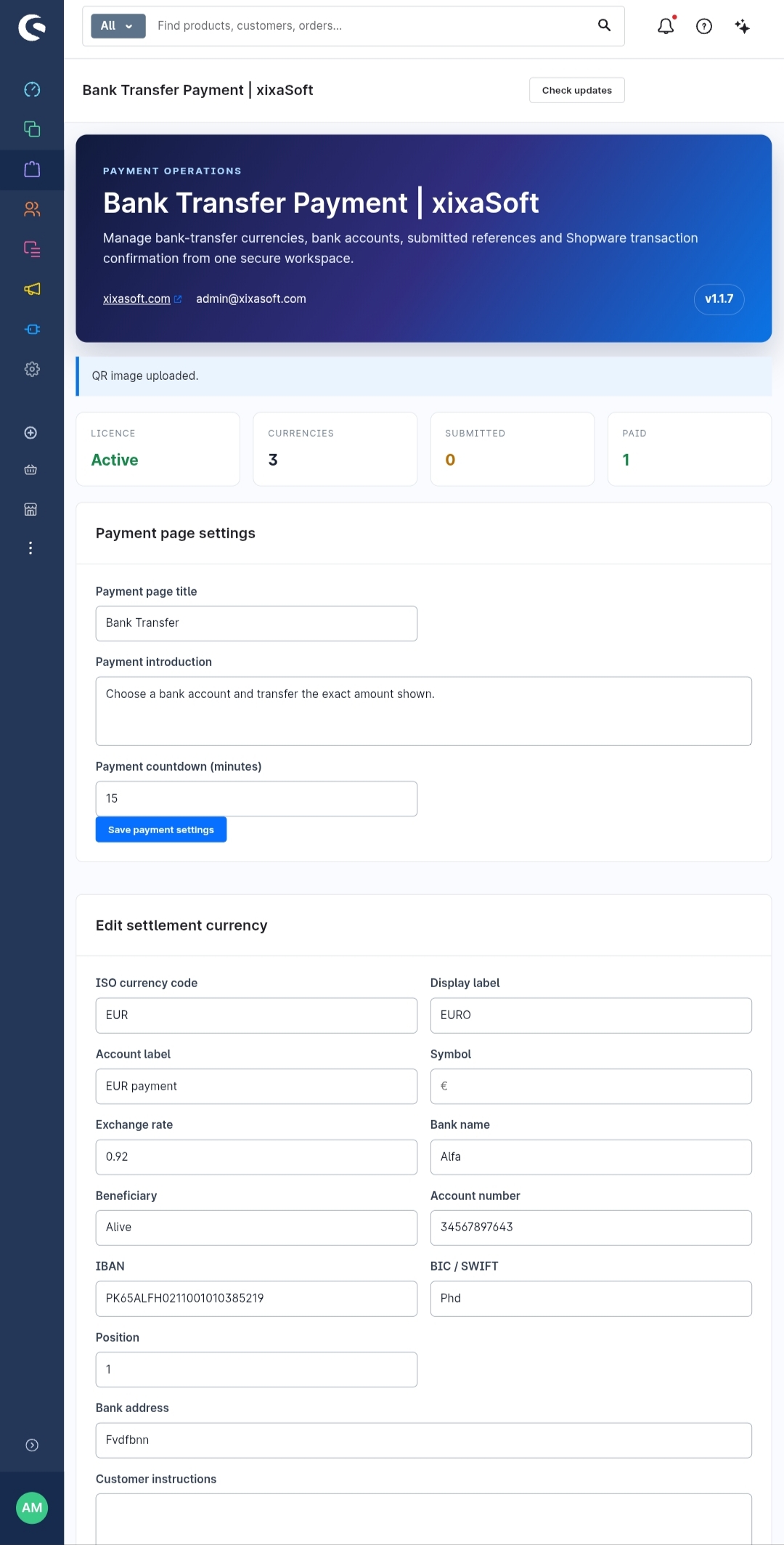
From a centralized administration dashboard, you can manage supported currencies, configure bank accounts, review submitted payment references, verify customer transfers, and manage the corresponding Shopware transaction status.
Multi-Currency Bank Accounts
Configure different bank accounts for different currencies.
For example, you can maintain separate payment information for:
EUR (€)
USD ($)
GBP (£)
CHF
Other currencies configured for your store
Customers can be shown the appropriate bank-transfer information according to their order currency, helping reduce incorrect transfers and unnecessary manual communication.
Currency-Specific Bank Details
Each supported currency can have its own banking information, including:
Bank Name
Bank Address
Account Holder / Beneficiary
IBAN / Account Number
BIC / SWIFT Code
Payment Instructions
Payment Reference Instructions
This makes the plugin suitable for stores selling internationally and receiving transfers through different accounts or currencies.
Bank Transfer at Checkout
Customers can select Bank Transfer as their payment method during the Shopware checkout process.
The plugin provides the required payment information so customers know where and how to transfer the order amount.
Clear instructions can be provided to help customers complete their payment correctly.
Order Number as Payment Reference
Customers can be instructed to use their Shopware order number as the bank-transfer reference.
For example:
Order: #10542
Transfer Reference: 10542
This makes it easier for administrators to associate incoming bank transfers with the correct Shopware order.
Customer Payment Reference Submission
After making a transfer, customers can submit their payment or transaction reference.
The submitted information is connected with the relevant order, giving administrators a convenient way to identify payments awaiting verification.
Payment Verification Workflow
A submitted reference does not have to mean that a payment is automatically considered received.
Administrators can review the submitted information and compare it with the actual incoming bank transaction before confirming the payment.
This provides greater control over manual bank-transfer payments.
Shopware Transaction Confirmation
Once the transfer has been received and verified, the associated Shopware transaction can be confirmed through the payment-management workflow.
This helps keep your Shopware order and payment information synchronized with the actual bank transfer.
Central Payment Operations Dashboard
The plugin provides a dedicated workspace for managing bank-transfer operations.
Administrators can conveniently manage:
Currencies — Configure the currencies available for bank-transfer payments.
Bank Accounts — Maintain bank details associated with individual currencies.
Submitted References — Review payment references submitted by customers.
Orders & Transactions — Identify the Shopware order associated with each payment.
Payment Confirmation — Confirm verified transfers and manage their transaction status.
Designed for International Stores
Bank transfers remain an important payment option for B2B transactions, high-value orders, regional customers, and customers who prefer direct account-to-account payments.
With multi-currency bank account management, Bank Transfer Payment | xixaSoft provides a practical solution for Shopware merchants selling across different markets.
Key Features
Shopware bank-transfer payment method
Multi-currency bank account management
Separate bank details for individual currencies
Currency-specific payment instructions
IBAN and BIC/SWIFT support
Beneficiary and bank information management
Customer payment reference submission
Order-number payment references
Centralized payment operations dashboard
Submitted transfer management
Manual payment verification workflow
Shopware transaction confirmation
Order and payment association
International bank-transfer support
Responsive administration interface
Designed for professional Shopware stores
Typical Payment Workflow
1. Customer places an order
The customer completes checkout and selects Bank Transfer as the payment method.
2. Bank details are provided
The appropriate payment information is presented according to the configured currency.
3. Customer makes the transfer
The customer transfers the required amount and uses their order number as the payment reference.
4. Payment reference is submitted
The customer provides their bank transaction/reference information.
5. Merchant verifies the payment
The administrator checks whether the corresponding payment has arrived in the configured bank account.
6. Transaction is confirmed
After successful verification, the Shopware transaction can be confirmed and the order can continue through the normal fulfillment process.
Why Use Bank Transfer Payment | xixaSoft?
Managing bank transfers manually can require checking orders, emails, payment references, bank accounts, and Shopware transaction statuses separately.
Bank Transfer Payment | xixaSoft brings these operations into a more organized workflow.
It is designed to help merchants:
Reduce manual payment administration
Organize multiple bank accounts
Support international currencies
Match transfers with Shopware orders
Collect customer payment references
Verify payments before confirmation
Maintain clearer transaction records
Manage bank-transfer operations from one workspace
Built for Shopware
The plugin is designed specifically for the Shopware environment and integrates the bank-transfer process with Shopware orders and payment transactions.
Whether you operate a local store, an international digital-product business, or a B2B Shopware store, Bank Transfer Payment | xixaSoft gives you greater control over direct bank-transfer payments.
xixaSoft
Website: xixasoft.com
Support: admin@xixasoft.com
Bank Transfer Payment | xixaSoft — a centralized bank-transfer payment and verification solution for Shopware.
Recent releases and product improvements.
Fixed the UI bugs.
Fixed the UI bugs.
Only customers with a paid purchase of this product can submit a rating and review.
Great Plugin, UI Could Be Improved
The Bank Transfer Payment Shopware 6 | xixaSoft plugin works well and provides the essential functionality needed to manage bank transfer payments in Shopware 6. The setup is straightforward, and the payment process works reliably.
I’m giving it 4 stars because the administration interface could use some improvements. A cleaner and more modern UI, better spacing, and a more intuitive layout would make managing bank accounts and payment information easier.
Overall, it’s a useful and functional plugin. With some UI improvements, it could easily become a 5-star product.
UI bug is Fixed.